 TUR
































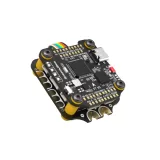
SpeedyBee F405 V3 BLS 50A 30x30 FC & ESC Stack

- Power Input (FC and ESC): 3-6S LiPo
- Continuous Current (ESC): 50A * 4
- Mounting (FC and ESC): 30.5 x 30.5 mm (4 mm hole diameter)
- Dimensions: (FC) 41.6(L) x 39.4(W) x 7.8(H)mm - (ESC) 45.6(L) * 44(W) * 6.1mm(H)
- Weight: (FC) 9.6g - (ESC) 13.8g
- PWM Frequency Range: X
Detail
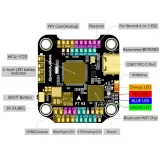
STM32F405 FC (better than F411), built-in 4-level battery life indicator, 4 GB
Blackbox SD card slot for your flight logs, 4 group LED strip pads,
* DJI connector for your digital quad and built-in Bluetooth for wireless configuration in SpeedyBee app.
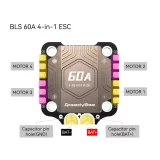
Remember the powerful 50A 4-in-1 ESC produced with a TVS protection diode + Japan-made TDK SMT capacitors + external 1000uF low ESR capacitor, all for durability and smooth flight.
* The DJI Air Unit connector is fully compatible with DJI O3/RunCam Link/Caddx Vista/DJI Air Unit V1, no cables need to be replaced.
Box contents
- Available visually
1. Open STACK Manual in a New Tab
Click here to open the STACK Manual in a new tab2. Download STACK Manual
Click here to download the STACK ManualSTACK: SpeedyBee F405 V3 BLS 50A 30x30 FC & ESC Stack Manual Connection Image
Open the Manual in a New Tab
MCU (FC):
STM32F405
IMU(Gyro)(FC):
BMI270
USB Port Type (FC):
Type-C
Barometer (FC):
Built-in
OSD Chip (FC):
AT7456E chip
BLE Bluetooth (FC):
Supported. Used for Flight Controller configuration (MSP should be enabled on UART4 at 115200 baud rate)
DJI Air Unit Connection Way (FC):
Supported two ways: 6-pin connector or direct soldering.
6-pin DJI Air Unit Plug (FC):
Supported. Fully compatible with DJI O3/RunCam Link/Caddx Vista/DJI Air Unit V1, no cables need to be replaced.
Flash(for BlackBox) (FC):
*Betaflight firmware requires the microSD card type to be Standard (SDSC) or High Capacity (SDHC), therefore expanded capacity cards (SDXC) are not supported (many high-speed U3 cards are SDXC). The card should also be formatted with FAT16 or FAT32 (recommended) file systems. You can use any SD card less than 32 GB, but Betaflight can only recognize a maximum of 4 GB. We recommend using this third-party formatting tool and selecting ‘Overwrite formatting’ and then formatting your card. Also, check here for recommended SD cards or purchase tested cards from our store.
BetaFlight Camera Control Pad (FC):
Yes (On the front CC pad)
Power Input (FC):
3S - 6S LiPo (via the 8-pin connector G, BAT pins/pads or the 8 pads on the bottom)
5V Output (FC):
9 group 5V output, with four +5V pads on the front and one BZ+ pad (used for Buzzer) and 4x LED 5V pads. Total current load is 2A.
9V Output (FC):
2 group 9V output, one +9V pad on the front and the other included in a connector on the bottom. Total current load is 2A.
3.3V Output (FC):
Supported. Designed for receivers with 3.3V input. Current load up to 500mA.
4.5V Output (FC):
Supported. Designed for receiver and GPS module even when powered through the FC USB port. Current load up to 1A.
ESC Signal Pads (FC):
M1 - M4 on the bottom, M5-M8 on the front.
UART (FC):
6 sets (UART1, UART2, UART3, UART4 (dedicated for Bluetooth connection)), UART5 (dedicated for ESC telemetry), UART6
ESC Telemetry UART (FC):
UART R5
LED Pad (FC):
Supported. 5V, G and LED pads at the bottom of the front. Used for WS2812 LEDs controlled by Betaflight software.
Buzzer (FC):
BZ+ and BZ- pads used for 5V Buzzer
BOOT Button (FC):
Supported. [A]. Press and hold the BOOT button and power on the FC at the same time to force the FC into DFU mode, used for flashing firmware when the FC is bricked. [B]. While the FC is on and in standby mode, the BOOT button can be used to control the LED strips connected to the LED1-LED4 connectors at the bottom. By default, a short press of the BOOT button will change the LED display mode. Long pressing the BOOT button toggles between SpeedyBee-LED mode and BF-LED mode. In BF-LED mode, all LED1-LED4 strips will be controlled by Betaflight firmware.
Supported Flight Controller Firmware (FC):
BetaFlight (Default), INAV (INAV firmware can only use Multishot (recommended) and OneShot125. Note that DShot is not supported.)
Firmware Target Name (FC):
SPEEDYBEEF405V3
Mounting (FC):
30.5 x 30.5 mm (4 mm hole diameter)
Dimension (FC):
41.6(L) x 39.4(W) x 7.8(H)mm
Weight (FC):
9.6g
Firmware (ESC):
BLHeli_S JH50
PC Configurator Download Link (ESC):
https://esc-configurator.com/
Continuous Current (ESC):
50A * 4
Burst Current (ESC):
55A (5 seconds)
TVS Protective diode (ESC):
Yes
External Capacitor (ESC):
1000uF Low ESR Capacitor (Included in Package)
ESC Protocol (ESC):
DSHOT300/600
Power Input (ESC):
3-6S LiPo
Power Output (ESC):
VBAT
Current Sensor (ESC):
Supported (Scale=386 Offset=0)
ESC Telemetry (ESC):
Not Supported
Mounting (ESC):
30.5 x 30.5 mm (4 mm hole diameter)
Dimension (ESC):
45.6(L) * 44(W) * 6.1mm(H)
Weight (ESC):